Pinterest Video Downloader
Download Pinterest videos, Idea Pins, GIFs, and high-resolution photos in 1080p Full HD, 2K, and 4K MP4—free, fast, and with no watermark.
Pinterest Video Download Online in 1080p, 2K & 4K HD Quality
PinDownload.io is a free browser-based Pinterest video downloader built to help you save public Pinterest videos, Idea Pins, animated GIFs, and high-resolution images directly to your phone, tablet, or computer. Because Pinterest does not include a built-in button to save video Pins for offline viewing, our tool extracts the original media stream directly from Pinterest's CDN and delivers it as a universal MP4 file in seconds.
Unlike basic downloaders that compress your media or cap resolution at 480p, PinDownload.io preserves the exact source bitrate uploaded by the creator—supporting 720p HD, 1080p Full HD, 2K, and 4K video downloads alongside one-click Video Cover Image (JPG) extraction. Everything runs inside your web browser with zero software installation, zero watermarks, and no account registration.
How to Download Pinterest Videos Online in 3 Steps
Saving a video, GIF, or photo from Pinterest takes less than ten seconds on any browser.
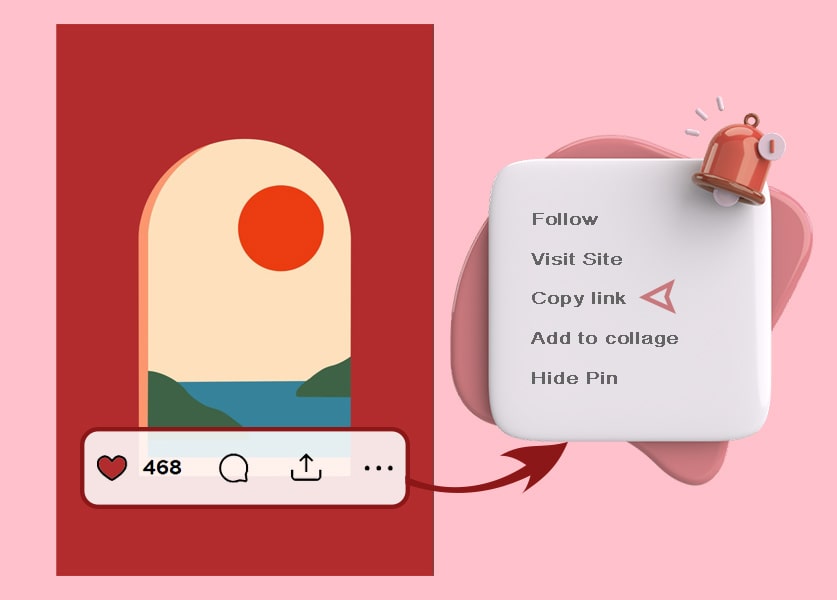
Copy the Pinterest Pin URL
Open the Pinterest mobile app or website, locate the public video, Idea Pin, or image you want to save, tap the Share icon (or the ••• menu), and select Copy Link. Both full links (pinterest.com/pin/...) and mobile shortlinks (pin.it/...) are supported.
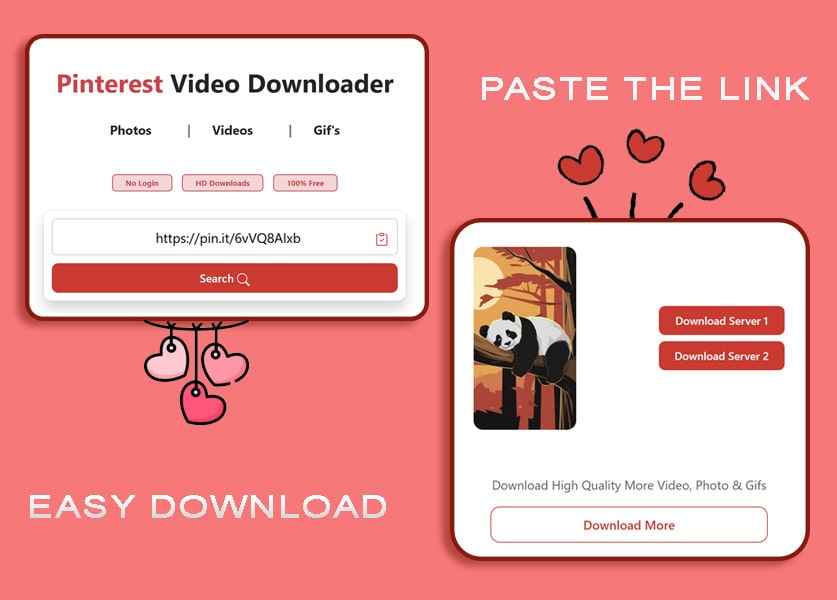
Paste the Link into PinDownload.io
Return to PinDownload.io, tap the clipboard Paste icon to insert your copied URL into the search box at the top of the page, and click Search.
Select Your Format and Save
Preview the media and pick a download option—Download Server 1 or Server 2 for the MP4 video, original HD photo, or animated GIF (up to 1080p, 2K, or 4K, depending on the source), or Download Cover for the video's thumbnail—to save the file straight to your device.
Why Use PinDownload.io for Pinterest Downloads?
Engineered for original Pin quality preservation, high video bitrates, and instant browser downloads.
Full HD, 2K & 4K MP4 Video Preservation
When a creator uploads a high-bitrate video Pin, PinDownload.io fetches the best available source—up to 720p HD, 1080p Full HD, 2K, or 4K Ultra HD, depending on the upload. You receive a clean, standard H.264 MP4 file with original audio intact and no added watermark.
Exclusive Video Cover Image & Thumbnail Saver
Need the high-resolution cover frame or poster thumbnail from a Pinterest video Pin for a mood board or design reference? Alongside the MP4 download buttons, PinDownload.io provides a dedicated Download Cover button so you can grab the uncompressed JPG poster frame in one click.
Multi-Slide Idea Pins, Reels & Carousel Support
Multi-page Idea Pins and carousel posts often combine several video clips and static images inside a single Pin link. Our parser inspects the full public Pin payload and displays individual download buttons for every available slide, video clip, and image on the page.
Automatic pin.it Mobile Shortlink Resolution
When you copy a link from the official Pinterest Android or iOS app, Pinterest generates a shortened https://pin.it/... URL. PinDownload.io automatically resolves these mobile redirects on the backend—no manual link expansion needed.
Original Uncompressed Photos & Looping GIFs
Beyond video Pins, our tool works as an all-in-one Pinterest Image Downloader and Pinterest GIF Downloader. Save infographics, recipes, wallpapers, and looping animations in their native JPG, PNG, WebP, or GIF/MP4 format rather than settling for blurry feed thumbnails.
No App Install, No Account & Complete Privacy
PinDownload.io runs entirely in your browser across Chrome, Safari, Edge, Firefox, Brave, and Opera. We never ask for your Pinterest login credentials, never inject watermarks, and never store copies of your downloaded files or browsing history on our servers.
Supported Pinterest Media Types and Output Formats
Every public Pinterest format is parsed directly from the origin server without re-encoding loss.
| Pinterest Media Type | Supported Input URLs | Output Format | Maximum Quality Available |
|---|---|---|---|
| Standard Video Pins | pinterest.com/pin/... & pin.it/... |
.mp4 (H.264 with Audio) | Up to 1080p Full HD, 2K & 4K |
| Idea Pins & Story Carousels | Public multi-page Pin links | .mp4 / .jpg (Per-slide) | Original creator upload resolution |
| Video Cover Thumbnails | Any public Pinterest video Pin URL | .jpg / .png | Full-size uncompressed poster frame |
| Pinterest Images & Photos | Public image and infographic Pins | .jpg, .png, .webp | Original master resolution (no resize) |
| Animated GIF Pins | Public animated or looping Pins | .gif & looping .mp4 | Native frame rate and original dimensions |
How to Save Pinterest Videos on Any Device
Select your device below for exact step-by-step instructions on where your downloaded video is saved.
Download Pinterest Videos on iPhone & iPad (iOS / iPadOS)
- In the Pinterest iOS app, tap Share on the video Pin and select Copy link.
- Open Safari on your iPhone or iPad (iOS 13 and newer) and go to PinDownload.io.
- Paste the Pin URL into the downloader box, tap Search, then tap Download Server 1 (or Server 2) below the preview.
- When Safari prompts you, tap Download. Tap the blue download arrow icon in the Safari address bar, open the downloaded MP4 file, tap the Share icon in the bottom-left corner, and tap Save Video to move it directly from your Files app to your iPhone Camera Roll / Photos app.
Pro Tip for Older iOS Versions: On iOS 12 or older, you can also use the free Documents by Readdle app's built-in browser to save Pinterest MP4 videos directly to your iPhone Photos roll.
Download Pinterest Videos on Android (Phone & Tablet)
- Open the Pinterest app on your Android phone, tap the Share icon on any public video Pin, and tap Copy link.
- Open Google Chrome (or your default mobile browser) and visit PinDownload.io.
- Tap the clipboard Paste icon to insert the
pin.itlink into the input box and tap Search. - Tap Download Server 1 (or Server 2); the file downloads automatically to your Android Downloads folder and appears immediately inside your phone's Gallery or Google Photos app.
Download Pinterest Videos on PC, Mac & Laptop
- Open
pinterest.comin Chrome, Safari, Edge, or Firefox, open the Pin you want to keep, and copy the URL from your browser's address bar (or click the•••menu and select Copy link). - Paste the URL into PinDownload.io and click Search.
- Click Download Server 1 (or Server 2) next to the preview. If the video opens in a new browser tab instead of downloading immediately, right-click the video player and select Save video as....
- Press Ctrl + J on Windows or Cmd + Shift + J on Mac at any time to view your browser's download history and open the saved file in your
Downloadsfolder.
Responsible Use, Technical Scope & Copyright Compliance
DMCA Safe-Harbor PolicyPinDownload.io is an independent technical utility designed to help creators, designers, educators, and everyday users save publicly accessible media for personal offline reference, mood boards, and authorized projects. To keep our platform transparent and compliant with intellectual property laws, please note what our tool can and cannot do:
Public Pins Only
PinDownload.io only processes publicly accessible Pinterest URLs. Our tool cannot access private accounts, secret or invite-only boards, deleted Pins, or login-gated content.
Zero Server Hosting
PinDownload.io does not host, archive, index, or store any video, image, or GIF files on its servers. All media streams are fetched directly from Pinterest's public CDN (pinimg.com).
Creator Copyright
Always obtain permission from the original copyright holder before reposting or monetizing downloaded media outside of personal offline viewing or permitted fair use.
Are you a copyright owner who wants to block a specific Pin URL from being processed?
Submit a Pin-URL Block Request (DMCA)PinDownload.io is not affiliated with, endorsed, or sponsored by Pinterest, Inc. All trademarks and copyrights belong to their respective owners.
Kindly read our Terms of Use before using this website. By using our website, you have accepted the "Terms & Conditions".
Frequently Asked Questions (FAQ)
Everything you need to know about downloading Pinterest videos, Idea Pins, GIFs, and cover images.
https://pin.it/... links generated by the Pinterest Android and iPhone apps, as well as full desktop pinterest.com/pin/... URLs and country-specific Pinterest domains (such as in.pinterest.com or de.pinterest.com).